Independent extender & router guidesHelping you find your connection.
The guide library

A TV plugged into an extender is still using a wireless backhaul

Explore the guide library · Extender connection checks

An Ethernet cable from a television to an extender removes one wireless hop, but may leave another upstream.
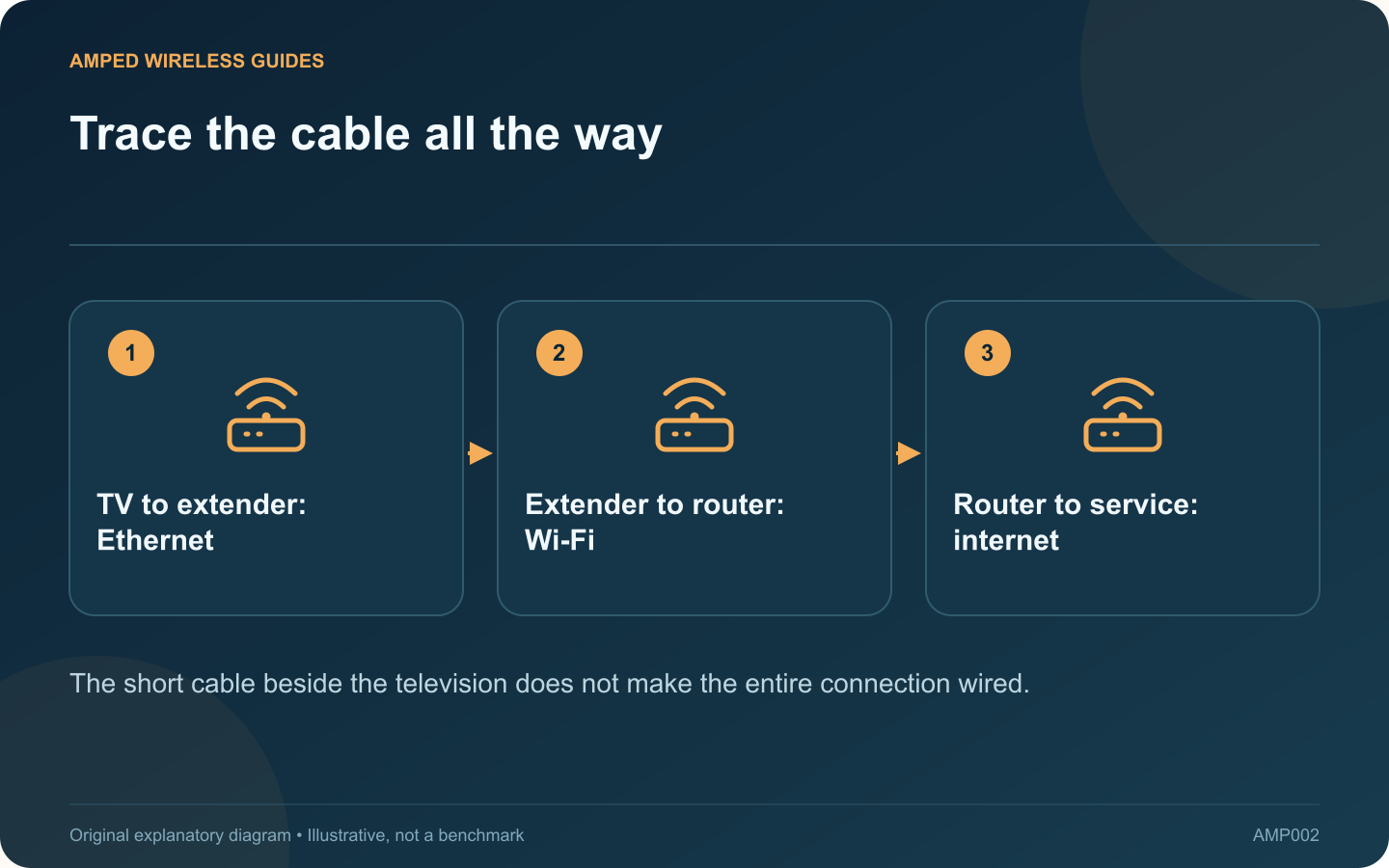
Trace the cable all the way: TV to extender: Ethernet; Extender to router: Wi-Fi; Router to service: internet
The short cable beside the television does not make the entire connection wired.

Connecting a television or console to an extender’s Ethernet port can be useful, especially when the device’s own wireless adapter is weak. However, if the extender connects to the router over Wi-Fi, the stream still depends on that wireless backhaul.

Draw the actual path

Write the sequence as television, cable, extender, wireless link, router and internet. TP-Link describes this Ethernet bridge function on supported extenders. The cable changes the client-facing segment; it does not replace the radio connection between the extender and router.

Check the port specification

Some extenders have Fast Ethernet ports and others have Gigabit or faster ports. Read the exact model’s specification. The wireless speed class printed on the front of the box does not establish the Ethernet port’s rate.

Measure the useful improvement

Compare the television’s normal playback before and after using the cable. Keep the extender in the same position and use the same service. If buffering improves, the local client connection may have been a contributor, but the result does not prove the upstream path is now unlimited.

Investigate remaining interruptions

  • Check the extender’s signal from the router.
  • Observe whether another client behind it fails simultaneously.
  • Confirm the main router remains online.
  • Try a better supported extender location.

Recognize a different operating mode

On models that support Access Point mode, the Ethernet cable can instead supply the upstream network to the extender. That requires the documented mode and wiring arrangement. Merely inserting a cable does not necessarily switch roles automatically.

For a demanding fixed television or gaming setup, a continuous wired path may be worth planning. Until then, describe the existing arrangement accurately as a wired client behind a wireless bridge. That makes purchase decisions and troubleshooting much clearer than treating the presence of any Ethernet cable as proof that Wi-Fi is no longer involved.

Sources and editorial notes

Sources checked 8–9 October 2026. Independent guidance and original illustrations; product comparisons use published specifications rather than hands-on benchmarks. Check the exact model, revision and regional documentation before changing settings.

Related guides

300 FAQs across our guide libraries

Quick answers

100 practical questions from Amped Wireless Guides.

Browse all 100 FAQs
Does plugging a television into an extender create wired backhaul?

Connecting a television or console to an extender's Ethernet port can be useful, especially when the device's own wireless adapter is weak. However, if the extender connects to the router over Wi-Fi, the stream still depends on that wireless backhaul. Write the sequence as television, cable, extender, wireless link, router and internet. TP-Link describes this Ethernet bridge function on supported extenders. The cable changes the client-facing segment; it does not replace the radio connection between the extender and router.

Read the full guide and sources
Why can an extender show full Wi-Fi bars but have no internet?

Standing beside an extender can produce full Wi-Fi bars even when web pages will not load. Those bars mainly describe the nearby wireless connection. The extender still needs a working path to the router, and the router needs internet access. Use a known device connected directly to the main router and test an ordinary website. Confirm the phone has not switched to cellular data. If the direct connection also fails, investigate the router or provider before changing extender placement.

Read the full guide and sources
Why might an old extender stop connecting after a WPA3 upgrade?

A router security upgrade can expose an older extender's compatibility limit. If the extender stopped connecting immediately after the router moved to WPA3-only operation, investigate the supported security modes before moving it around the house. Note the old and new router security setting and whether the network name or password also changed. Several simultaneous changes make the symptom harder to interpret. Confirm that a compatible modern client can still join the intended router network.

Read the full guide and sources
Why can an extender change the device identity seen by router rules?

A router rule tied to a device's MAC address may behave differently after that device joins through an extender. Some extenders use a proxy arrangement that presents a translated address upstream. The router may therefore be applying the rule to a different identifier than you expect. TP-Link documents virtual client MAC addresses for particular proxy-mode extender arrangements. This is not a universal description of every extender, access point or mesh system. Read the instructions for the exact model and operating mode.

Read the full guide and sources
Independent. Practical. Clear.

Amped Wireless Guides is an independent information website. We are not affiliated with or endorsed by Amped Wireless. Product names belong to their respective owners.